Can the TV remote be used to control the DIRECTV Genie Whole-Home HD DVR?
While the DIRECTV® remote control supplied with the Genie™ Whole-Home DVR is recommended to control the receiver, the remote supplied with the TV can also be programmed to control many of the Genie's everyday functions.
The chart below is a list some functions of the Genie and the button on the TV remote that can operate these commands:
The following image is an example of the remote supplied with the TV:
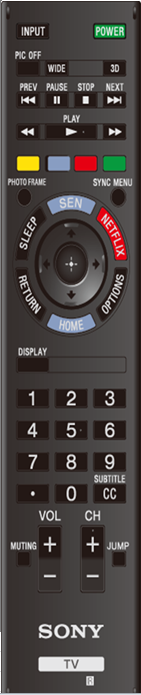
The chart below is a list some functions of the Genie and the button on the TV remote that can operate these commands:
| Genie Functions | TV Remote Buttons |
| On/Off | Power |
| Change channels | CH +/- |
| Previous channel | Jump |
| Manual channel numbers | 0-9 |
| Change volume | VOL +/- |
| Mute | Muting |
| Control pad | Select (Center), Up, Down, Left and Right |
| Sync Menu | Channel Up, Channel Down, Numbers 0-9 and Jump |
| Blue | Enter |
| DVR controls | Play, Stop, Rewind, Fast Forward, Next and Prev |
| Record | Photo Frame |
| Green | Guide |
| Red | Red |
| Yellow | List |
| Menu | Sync Menu |
| Info | Display |
| Exit | Return |
The following image is an example of the remote supplied with the TV:
Product Repair
Repair information and service assistance
Community
Here you can ask questions and connect with other Sony users
Parts & Accessories
Product information and sales assistance
Register a Product
Keep track of all your products in one location
Contact Support
Product support & customer relations
Support by Sony (Mobile App)
Get Support Content on the Go!

