The setup steps for replacement hearing aids differ from those for the original pair, so follow them carefully. The steps may vary depending on your hearing aid model, what type of phone you have, and whether you're using version 3.3 or version 3.1 of the Sony | Hearing Control app. Just follow the instructions that apply to your situation!
Please note that you can continue to use your current hearing profile for the replacement set. You don't need to redo the hearing profile check.
Step 1: Get your new or replacement OTC hearing aids ready
Prepare the new or replacement hearing aids:
- For the CRE-C10:
Make sure you have a new set of batteries inserted in the hearing aids and keep the battery doors OPEN until instructed to close them during the app setup. - For the CRE-E10 and CRE-C20:
Place the hearing aids in the charging case until the LED light shows they are fully charged. Leaving the hearing aids in the case until instructed to remove them during the app setup. - If you still have your old (original) OTC hearing aids, make sure they are turned OFF to avoid interference when setting up the replacement hearing aids.
Step 2: Check which version of the app you are using
In the next part of the preparation process, you'll use the Sony | Hearing Control app to check and adjust certain settings. These steps may vary depending on the app version you're using.
- Open the Sony | Hearing Control app.
- Tap Settings (or Menu, if shown).
- Look for About, App information, or Version.
- Note the version number listed (for example, Version 3.3).
Tip
If you can’t find the version inside the app:
- Open the Settings app on your device.
- Select General, then iPhone Storage (or iPad Storage).
- Tap Sony | Hearing Control.
- The app version appears below the app name.
- Open the Sony | Hearing Control app.
- Tap Menu or Settings.
- Select About, App info, or Version information.
- Check the version number shown (for example, Version 3.3).
Tip
If the version isn’t visible in the app:
- Open your device Settings.
- Select Apps (or Applications)
- Find and tap Sony | Hearing Control.
- The app version appears under App details.
If you are an existing user with version 3.1 of the app installed, we strongly recommend upgrading to version 3.3 to prevent connection issues, if possible. You can download and update the Sony | Hearing Control app on your smartphone or tablet.
![]()
![]()
Step 3: Use the app to set up replacement hearing aids
Select your app version for the steps:
Select your model for the steps:
CRE-C10 setup
- Check the batteries. Make sure you have a new set of batteries in the replacement OTC hearing aids.
- Check the fit. Small click sleeves come attached; other sizes are available to purchase separately.
Note: If you already have different sizes available, attach a comfortable click sleeve size for each ear. - Reset the app: Open the Sony Hearing Control app and go to the Menu (three bars). Select Settings → App settings → Reset the app and then select OK.
- Pair the replacement OTC hearing aids with the app: Select the CRE-C10 from the device selection screen. Follow the app instructions, connecting each hearing aid one at a time.
- Keep the battery doors open until the app instructs you to close them.
- Important choices if prompted:
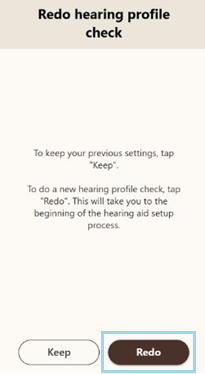
- Select Redo.
If you select Keep, the hearing aids will not be programmed.
- Select Restart.
If you select Resume, the hearing aids will not pair with the app.

- Continue with the on-screen instructions in the app. If you need additional instructions, feel free to refer to our Quick Setup Guide.
CRE-C20 setup
- Check the batteries. Fully charge your replacement OTC hearing aids.
- Check the fit. Small sleeves come attached; other sizes are available to purchase separately.
Note: If you already have different sizes available, attach a comfortable sleeve size for each ear. - Reset the app: Open the Sony Hearing Control app and go to the Menu (three bars). Select Settings → App settings → Reset the app and then select OK.
- Pair the replacement OTC hearing aids with the app: Select the CRE-C20 from the device selection screen. Follow the app instructions as directed by the app. Be sure to reconnect the CRE-C20 hearing aids one at a time by removing each hearing aid from the charger only when instructed by the app.
- Important choices if prompted
- Select Redo.
If you select Keep, the hearing aids will not be programmed.
- Select Restart.
If you select Resume, the hearing aids will not pair with the app.
- Continue with the on-screen instructions in the app. If you need additional instructions, feel free to refer to our Quick Setup Guide.
CRE-E10 setup
Select your phone type:
iPhone
- Check the batteries. Make sure your hearing aids are fully charged.
- Check the fit. Small click sleeves come attached; other sizes are available to purchase separately.
Note: If you already have different sizes available, attach a comfortable click sleeve size for each ear. -
Unpair the old hearing aids
-
Pair the replacement hearing aids with the iPhone’s settings
- Adjust Audio Routing. Set Media Audio to Never Hearing Devices for proper setup.
![]()
![]()
- App Connection.
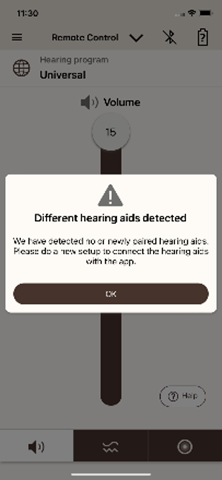
- Open the Sony Hearing Control App; when prompted with Different hearing aids detected, tap OK.
- Select the CRE-E10 from the selection screen.
- Once the screen shows Connection successful, tap Let’s go! to start setting up your replacement hearing aids.
- Create the hearing profile for your replacement hearing aids.
- Prepare your smartphone for setup.
- Disconnect any external devices from your phone (e.g., smartwatch, headphones, speakers).
- Unmute your phone. Move the Ring/Silent switch on the side of your phone so that orange isn’t displayed.
- Set the phone media volume to approximately 75%.
- After your phone settings are correct, select Continue on the Setup your Hearing Aids screen.
- Important choices if prompted
- Select Redo.
If you select Keep, the hearing aids will not be programmed.
- Select Restart.
If you select Resume, the hearing aids will not pair with the app.
- Continue with the on-screen instructions in the app. If you need additional instructions, feel free to refer to our Quick Setup Guide.
Android
- Check the batteries. Make sure your hearing aids are fully charged and leave them in the charging case.
- Check the fit. Small sleeves come attached; other sizes are available to purchase separately.
Note: If you already have different sizes available, attach a comfortable click sleeve size for each ear. - Reset the app: Open the Sony Hearing Control app and go to the Menu (three bars). Select Settings → App settings → Reset the app and then select OK.
- Pair the replacement OTC hearing aids with the app:
- Select the CRE-E10 from the device selection screen.
- Take both replacement hearing aids out of the charging case and lay them next to your phone. Select Hearing Aids – Left + Right to pair them to the app → select Pair twice, once for each hearing aid.
- Once the screen shows Connection successful, tap Let’s go! to start setting up your replacement hearing aids.
- Create the hearing profile for your replacement hearing aids.
- Prepare your smartphone for setup.
- Disconnect any external devices from your phone (e.g., smartwatch, headphones, speakers).
- Unmute your phone. Move the Ring/Silent switch on the side of your phone so that orange isn’t displayed.
- Set the phone media volume to approximately 75%.
- After your phone settings are correct, select Continue on the Setup your Hearing Aids screen.
Important choices if prompted:
- Select Redo.
If you select Keep, the hearing aids will not be programmed.
- Select Restart.
If you select Resume, the hearing aids will not pair with the app.

- Continue with the on-screen instructions in the app. If you need additional instructions, feel free to refer to our Quick Setup Guide.