Guided Support is available!
![]()
Your TV may turn on or off for a variety of reasons. The following information provides steps to help troubleshoot this issue.
Notes:
- To prevent your TV from being turned off by a BRAVIA™ Sync (HDMI-CEC, ARC, eARC) capable soundbar or other device connected to your TV, check to make sure the connected device is not set to turn off the TV with an auto-off feature or timer. If you have a Bose® soundbar and the SoundTouch® app, use the app to disable the Auto-off feature. For specifics or other settings and devices, refer to the manufacturer for support.
- Not all TVs will have the features required to complete each of the steps provided. Check your TV
manuals
![]() for model-specific information.
for model-specific information. - To check the type of TV you have, refer to the How to check if your BRAVIA TV is a Google TV™, Android TV™, or other TV article.
1. Perform a power reset of the TV.
- Turn off the TV.
IMPORTANT: For a projection TV that uses an internal lamp wait 5 minutes after turning off the TV to allow the lamp to cool before continuing.
- Unplug the TV power cord from the electrical outlet.
- Let the television remain without power for 60 seconds.
- Plug the power cord back into the electrical outlet.
Note: If your TV was plugged into a power strip or surge protector, plug it directly into the wall outlet if the power strip or surge protector was causing a problem.
- Turn on the TV.
2. Update the TV software to the latest version.
Updating the TV software to the latest version may fix specific issues.
3. Check the settings of the TV.
If the TV turns on or off at regular intervals, such as 30 minutes to an hour, or if the TV turns on or off when an HDMI-connected device is powered on or off, check the settings of the TV.
If the TV is turnning on automatically:
Disable the On timer or Timer
Note: On timer may not be displayed depending on the model. Check your manual for model-specific information. Manuals are posted on your model support page.
- On the remote control, press the Quick Settings (
 or
or  ) button.
 - Select On timer or Timer.
- Select On timer or Timer, then turn off the timer settings.
Disable the TV auto power on setting in BRAVIA Sync settings or HDMI CEC Settings.
- On the remote control, press the Quick Settings ( or ) button.
- Select Settings.
- The next steps will depend on your TV menu options:
- Select Channels & Inputs → External inputs → BRAVIA Sync settings → BRAVIA Sync control → TV auto power on → Off.
- Select Channels & Inputs → External inputs → HDMI CEC Settings → Auto TV on → Off.
If the TV is turning off automatically:
Adjust the energy saver settings
- On the remote control, press the Quick Settings ( or ) button.
- Select Settings.
- Select System.
- The next steps will depend on your TV menu options:
- Select Power and energy → Energy saver → Turn off TV after → Never.
- Select Power & Energy → Idle TV power off → off.
- Select Power & Energy → Idle TV standby → off.
Set the Sleep timer to Off
- On the remote control, press the Quick Settings button.
- Select Sleep timer, then set it to Off.
Set the Auto shut-off to Off
Note: Not all Google TVs have an Auto shut-off setting. Check your manual for model-specific information. Manuals are posted on your model support page.
- On the remote control, press the Quick Settings ( or ) button.
- Select Settings.
- Select System.
- Select Power and Energy.
- Check the next menu options and refer to the procedure for your TV model
- If there is an Auto shut-off option: Select Auto shut-off, then set it to Off.
- If there is an Auto turn-off option: Select Auto turn-off → Turn-off when inactive or Turn-off when watching, then set it to Never.
Note: If Turn-off when inactive is enabled, the TV will turn off when there is no user activity, but it will remain on while you're watching content. If Turn-off when watching is enabled, the TV will turn off when there is no user activity, even if you're watching content. To prevent unintended power-offs, set both Turn-off when inactive and Turn-off when watching to Never.
Note: If you use a device such as a Voice Remote Control or smart speaker, it may react to everyday conversations by mistake and cause the TV to turn on or off. Change the smart device settings as needed.
If the TV is turning on automatically:
Disable On timer:
Note: Not all Android TVs have an On timer setting. Check your manual for model-specific information. Manuals are posted on your model support page.
- Press the HOME button on the remote control.
- The next steps will depend on your TV menu options:
- Select
 (Timers icon).
Note: The location of the
Timers icon

differs depending on the model. It is located in the upper right corner of the Home screen, or the Settings category at the bottom of the Home screen.
- Select Apps → Timer.
- Select On timer or Timer.
- Uncheck On timer or Timer.
Set the Auto TV on or TV auto power on to Off:
- Press the HOME button on the remote control.
- Select
 Settings.
 - The next steps will depend on your TV menu options:
- Select Watching TV → External Inputs → HDMI CEC Settings or BRAVIA Sync settings.
- Select BRAVIA settings → External Inputs → HDMI CEC Settings → CEC.
- Select External Inputs → BRAVIA Sync settings.
- Select Auto TV on or TV auto power on.
- Set to Off.
Set the Remote Start to Off:
- Press the HOME button on the remote control.
- Select Settings.
- The next steps will depend on your TV menu options:
- Select Network & Internet → Remote Start.
- Select Network → Remote Start.
- Select BRAVIA Settings → Remote Start.
- Set to Off.
If the TV is turning off automatically:
Check the Daydream or Screen saver settings:
- Set When to Sleep or Put device to sleep to Never.
- Press the HOME button on the remote control.
- Select Settings.
- The next steps will depend on your TV menu options:
- Select Device Preferences → Screen saver → Put device to sleep → Never. (Android™ 10 or 9)
- Select Screen saver → Put device to sleep → Never. (Android 8.0 or 7.0)
- Select Daydream → When to sleep → Never. (Android 6.0 or earlier)
- Set Daydream or Screen saver to Backdrop or Colours.
Note: Backdrop or Colours may not be displayed depending on the model. In that case, this setting is unnecessary.
- Press the HOME button on the remote control.
- Select Settings.
- The next steps will depend on your TV menu options:
- Select Device Preferences → Screen saver → Screen saver. (Android 9)
- Select Screen saver → Screen saver. (Android 8.0 or 7.0)
- Select Daydream → Daydream. (Android 6.0 or earlier)
- Set to Backdrop or Colours.
Note: To prevent screen burn-in, when Daydream or Screen saver is set to Sleep, None, or Put device to sleep, the TV goes to sleep mode after the time period set in When to Daydream or When to start. This function still works even if When to Sleep or Put device to sleep are set to Never. However, it does not activate when a program or movie is playing on the TV.
Set the Sleep timer, Idle TV standby, and Auto shut-off to Off:
- Set the Sleep timer to Off.
Note: Not all Android TVs have a Sleep timer setting. Check your manual for model-specific information. Manuals are posted on your model support page.
- Press the HOME button on the remote control.
- The next steps will depend on your TV menu options:
- Select (Timers icon) → Sleep timer → Off.
Note: The location of the
Timers icon
differs depending on the model. It is located in the upper right corner of the Home screen, or the Settings category at the bottom of the Home screen.
- Select Apps → Timer → Sleep timer → Off.
- Set Idle TV standby to Off.
Note: Depending on the model, the Auto shut-off function may also need to be turned off.
- Press the HOME button on the remote control.
- Select Settings.
- The next steps will depend on your TV menu options:
- Select Device Preferences → Power → Idle TV standby → Off.
- Select BRAVIA settings → Eco → Idle TV standby → Off.
- Select Power → Eco → Idle TV standby → Off.
- Set Auto shut-off to Off.
Note: Not all Android TVs have an Auto shut-off setting. Check your manual for model-specific information. Manuals are posted on your model support page.
- Press the HOME button on the remote control.
- Select Settings.
- The next steps will depend on your TV menu options:
- Select Device Preferences → Power → Auto shut-off → Off.
- Select BRAVIA settings → Eco → Auto shut-off → Off.
If the power is turning on:
- Set the Timer to Off:
- Press the HOME button on the remote.
- Select Settings.
- Select Preferences in the Settings category.
- Select Clock/Timers.
- Select Timer.
- Set to OFF.
- Set the TV auto power on settings of the BRAVIA Sync settings to Off:
- Press the HOME button on the remote.
- Select Settings.
- Select External Inputs in the TV category.
- Select BRAVIA Sync settings.
- Select TV auto power on.
- Set to Off
If the power is turning off or the picture turns black while the sound remains:
- Set the Sleep Timer to Off:
- Press the HOME button on the remote.
- Select Settings.
- Select Preferences in the Settings category.
- Select Clock/Timers.
- Select Sleep Timer.
- Set to OFF.
- Check the following settings under the ECO section of the menu.
- Press the HOME button on the remote.
- Select Settings.
- Select Preferences in the Settings category.
- Select Eco.
- Check the settings of the Presence Sensor, Idle TV Standby, and Auto Shut-off.
Note: The following provides a better description of these settings:
- Clock/Timers:
- Timer: Turns on the TV from standby mode at a time you set, tuned to a channel or input of your preference.
- Sleep Timer: Turns the TV to standby mode after a preset length of time.
- ECO:
- Presence Sensor: When the sensor detects no motion in front of the TV for a certain period of time, it turns the picture off automatically while leaving the TV sound on. Additionally, if no presence is detected after 30 minutes in picture-off mode, the TV will switch to standby mode. Sometimes, it will turn off the TV if you are too close to the TV or the sensor is blocked by an object.
- Idle TV Standby: Turns the TV off after it has been idle for the preset length of time. For example, if you do not press a button on the remote control for a specified period of time, the TV will turn off.
- Auto Shut-off: Turns the TV off when no input signal is detected for a certain period of time.
4. Make sure the AC power cord is properly plugged in.
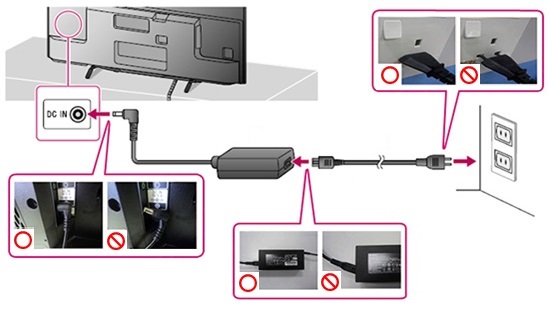
- If your TV has a power cord that can be removed, make sure that it is firmly plugged into the back of the TV.
- If the TV has a separate AC power adaptor, check the connection between the adaptor and the power cord.
- Make sure that the power cord is properly plugged into the AC outlet on the wall.
- Remove any power strips, surge suppressors, or other similar devices, and plug the TV directly into the AC outlet on the wall to verify that these additional devices are not causing the issue.
- Try a different AC wall outlet and make sure the outlet is not controlled by a switch that is turned off.
5. Check if it is a remote control issue.
Remove the batteries from the remote and check whether or not the issue persists. This tests whether the remote is malfunctioning rather than the TV.
Notes:
- If you are using a multi-function remote in addition to the supplied one, check it too.
- Covering the remote control sensor of the TV is also a way to check whether the issue occurs. Refer to the manual for information about the location of the remote control sensor. However, you can't verify using this method if the issue is caused by a remote control that is not an infrared type, such as the Touchpad Remote Control.
6. Check if it is an externally connected device issue.
Disconnect all external devices from the TV (USB, LAN, HDMI, Antenna, etc.) except the AC power cord (mains lead) and verify that external devices are not causing the issue. If it has improved, reconnect the devices one at a time until you find the device causing the issue.
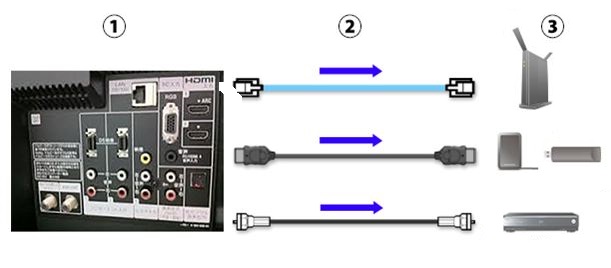
- 1: TV terminals
- 2: Remove cables
- 3: External devices
7. Turn off the Wi-Fi function of the TV.
If your TV has a Wi-Fi function, temporarily turn it off to test and help isolate the issue.
8. Reset the TV to the original factory settings.
If the issue still occurs, the TV may need repair. Go to Product Repair.
![]()


