Experience High-quality Audio easily without Looking
You can play music and adjust the volume on your Walkman using the TalkBack screen reading app*1. After you launch the app, swiping two fingers up and down switches the screen and enables you to read back the titles of the usable functions and settings visible on the new screen. Swiping left or right across the screen displays new information instantly. It is still possible to adjust volume, replay, stop, fast-forward and reverse using conventional buttons on the device.
You can transfer music files on your PC to the device by drag-and-drop actions without using any dedicated application.

Experience Dynamic Power at Any Time without Worrying about Your Surroundings
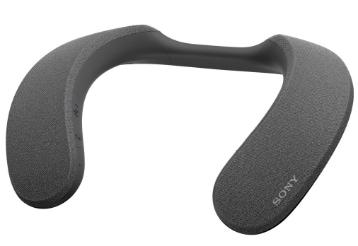
This wireless neckband speaker is ergonomically designed to fit securely around the neck enabling you to enjoy videos and music content in comfort for lengthy periods without worrying about your surroundings. The fact that the sounds from the speaker are delivered close to your ears means you can enjoy their impact at comfortable volumes, even in environments where loud noises must be suppressed out of consideration for those around you. Since the wearable neckband design leaves your ears uncovered, you can hear the intercom alerting you to visitors during online meetings, or pay attention to family conversations when you are watching TV or movies*1, or listening to music. You can also enjoy videos and music in the kitchen*2 while cooking or washing dishes.
The SRS-NB10 features Precise Voice Pickup Technology, which accurately provides advanced audio signal processing to allow other parties to hear your voice clearly despite background noise. In this way, you can participate in online meetings comfortably with no unpleasant feedback or echo.
In combination with the BRAVIA XR™, the SRS-NS7 allows you to enjoy 360 Spatial Sound that you almost feel as if you are in the movie scene. By connecting your smartphone or Walkman® via Bluetooth®, you can also experience music content through the immersive sound with 360 Reality Audio.



Control from the Ear
Wireless Noise-Canceling Headphones WH-1000XM5 has a touch sensor is integrated into the right side housing.
Touch the gesture panel on the housing, and you can Play, Pause, control the volume or answer a phone call without physical access to the smartphone. Get hands-free help - Just say "Hey Google" *1 or "Alexa"*2 to activate your preferred voice assistant.*3 Listen to music, connect with friends, get notifications, set reminders, and more. Furthermore, by placing one hand over the housing, the volume is temporarily reduced and ambient sounds can be easily heard. Train station announcements, or conversations can be heard seamlessly.


