VISION ASSIST
Home projector
Menus and buttons are screen readable on a web browser
You can use the screen reader function on your smartphone or computer to read menu settings of Home Projector. This function enable you to perform menu operations, turn the unit on and off and change the projector's input source via the network.
Compatible models: VPL-GTZ380、VPL-XW series
- *This function is only available in English for US and Canadian models. Please refer to the following for details of procedures.

VPL-GTZ380
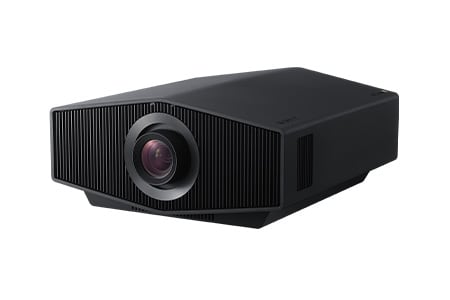
VPL-XW Series

Web Control UI display on a smartphone
VISION & ACTION ASSIST
Set the accessibility function
Text enlargement and screen reader functions provide better accessibility
"Text Magnification" function to increases the size of texts on the screen.
"Screen Reader" allows one to check the TV program guides on screen or to change TV settings without looking at the screen.
You can enjoy the BRAVIA™ TV with easy operation after activating the accessibility setting.
The accessibility function can be simply toggled on or off using the button on the remote controller.
- *"Screen Reader" and "Text Magnification" functions are in compliance with U.S. Code of Federal Regulations.
- *"Screen Reader" function is available only for some areas and languages.
- *"Text Magnification" function is available only for some applications.
- *"Screen Reader" and "Text Magnification" functions are available only for focus points.
- *The accessibility function on/off toggle function using the button on the remote controller is only available with certain models.

BRAVIA™ TV Accessibility Settings
ACTION ASSIST
Built-in Google Assistant for an Enhanced Television Experience
Hands-free Operation, Including Video Searches
Just say "OK Google" and name a task. Users of BRAVIA with the Google Assistant built in need not do more to, say, search for a YouTube™ video on their TVs. Voice commands can also be used to operate the BRAVIA itself, such as turn it on or off, or change the volume. It offers an enhanced television experience like none other.
- Supported models:
- Z9K Series, A95K Series, A90K Series, A80K Series, X95K Series, X90K Series, X85K Series, X80K Series
Z9J Series, A90J Series, A80J Series, X95J Series, X90J Series,
A9F/AF9 Series, A9G/AG9 Series, Z9F/ZF9 Series, X950G/XG95 Series, X950H/XH95 Series, Z9H/ZH9 Series
- *Availability may vary depending on country/region
- *You will need an Internet connection to use the voice search function and applications. Depending on which model you use, you may have to log into a Google account. You may also need to sign up or become a subscriber to use some applications.
- *You must agree to the Google Terms of Service and Google's Privacy Policy to use BRAVIA TVs equipped with Google LLC's Google TV / Android TV. More information is available in Google Terms of Service and Google's Privacy Policy.
- *Google, Google TV, YouTube and Android TV are trademarks of Google LLC.

*Image is for illustrative purposes.
HEARING ASSIST
Wireless Handy TV Speaker
Clear audio, even at a Distance from the TV
Wireless Handy TV Speaker SRS-LSR200 is a wireless television speaker that comes in handy when it is hard to hear the TV. You can hear the audio clearly through the speaker that you can place right by you. With a third speaker designed into the front of the SRS-LSR200, voices from your TV are clearer, making the program much more enjoyable. Sony's original technology provides hearing support through the Voice Zoom function. A large on/off switch, large and easy-to-turn volume dial, large buttons, easily legible print and other features make the remote simple for anyone to use.
- *As of October 2022, the Handy TV speaker SRS-LSR200 was on sale in Japan and Europe.

Wireless Handy TV Speaker SRS-LSR200
