Home Theater System:
BRAVIA Theatre Quad (HT-A9M2)
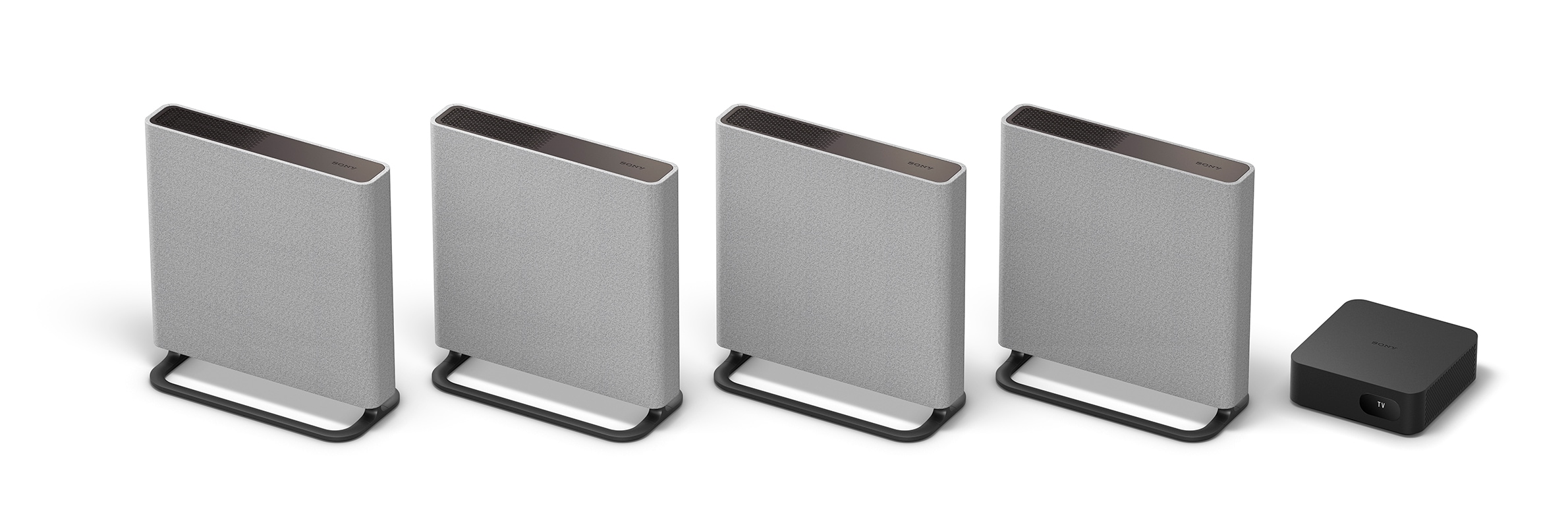
BRAVIA Theatre Quad (HT-A9M2) is a home theater system consisting of four speakers and a control box. Using Sony's unique surround sound technology "360 Spatial Sound Mapping," the four speakers create a vast sound field and fill your living room with stereo sound in 360 degrees. The system can easily be set up in any position thanks to the four slim speakers, which can be mounted on walls or stands, and to the sound field optimization technology. Users can enjoy a realistic sound environment in which they are surrounded by sound from all directions.
With the popularization of larger, higher resolution TVs and the spread of video streaming services, more people want to enjoy movies with high-quality sound at home. These trends have created a growing need for home audio equipment. Nevertheless, some customers have given up on installing speakers due to strict installation requirements, lack of space, or concerns about the speakers clashing with their interior decor. In response to these issues, Sony released the new HT-A9 Home Theater System in 2021. With four wireless speakers that can be freely installed and sound field optimization technology, the HT-A9 system offered unprecedented freedom of installation and authentic surround sound experience. Thanks to these features, the HT-A9 was a huge hit with users.
The new system BRAVIA Theatre Quad (HT-A9M2) is the successor to the HT-A9. The new system offers even greater freedom in installation and an improved surround sound experience. The speaker body is designed in a thin panel shape and wrapped in fabric material. This improves compatibility with interior decor and facilitates installation on or against a wall. We also improved the sound field optimization technology so that users can enjoy an even more realistic acoustic space.
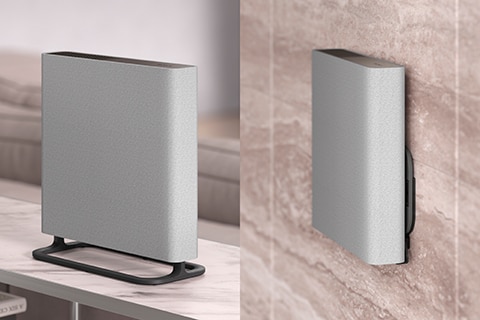
"Our user survey showed that an increasing percentage of customers with high-end home theater systems are mounting speakers on their walls," explains Tetsuya Hayashi of Sony Corporation. "The survey also indicated increased needs for wall mounting. In some cases, customers mount speakers on their walls due to lack of space. In response, we wanted to provide greater freedom in installation by making wall mounting easier. We therefore conducted further research into issues and needs related to wall mounting, and evaluated the acceptability of new speakers shapes. The result was a thin, square shape that allows BRAVIA Theatre Quad speakers to be hung on the wall like a picture. The four speakers can be set up wirelessly and positioned freely to suit the unique environment of your living room. For example, you can place some of the speakers on a TV stand or shelf and hang the remaining speakers on walls. The system then automatically corrects the sound field by considering the installation condition and position to create the ideal sound space. In this way, BRAVIA Theatre Quad brings the enjoyment of a high-quality surround sound experience even to customers whose lack of space made them hesitant to install a home theater system."

"Measuring the customer's usage environment and correcting the sound field are essential steps for providing a superior surround sound experience," says Tatsuya Tamaki of Sony Corporation. "In order to make it simple for customers to effectively correct their sound field, it was essential to develop a new UX (user experience) in addition to technology. Based on discussions with technology developers, planners, and designers, we proceeded with product development focusing on both technology and UX in mind."
During this development process, Tamaki emphasized the visualization of experience. The team engaged in repeated prototyping from the early stages of development, and repeatedly tested and improved the system.
"When working on BRAVIA Theatre Quad, the UX development team and the technology development team came together to repeatedly test and improve the experience through prototyping, recalls Tamaki. "Through prototyping at an early stage, we were able to clarify the experience value that we wanted to provide to customers and share that value among team members. This kept everyone focused on working together toward a single goal, which is a huge advantage of experience-driven product development."

"The term `acting out' refers to actions to use prototypes to act out actual usage scenarios. At one stage of development, we quickly made multiple prototypes and performed acting out as many as ten scenarios in one month. Of course, actual experiences are more useful than theoretical discussions in terms of giving birth to more diverse opinions and leading to better product development. During the time that we were engaged in development, there were restrictions on coming to the office due to the COVID-19 pandemic. Consequently, we had to perform acting out scenarios online as well as in person. During online sessions, we shared the operator behavior and the smartphone operating screen. This was advantageous because it allowed a large number of people to share the experience from the operator's perspective. Online participants observed the scenario being acted out, and posted their observations and opinions in the chat. By sharing the experience and exchanging opinions with many members involved in planning, design, and development, we were able to gain many insights from multiple perspectives. This development environment made it easy for project members to demonstrate their respective knowledge," says Tamaki.
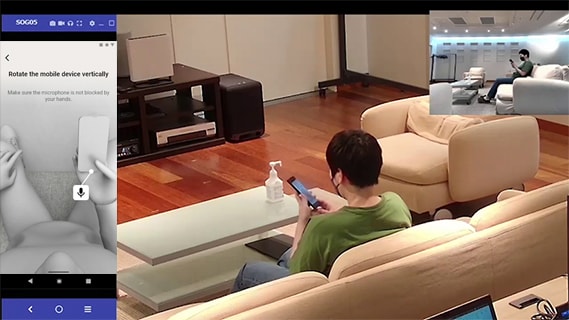
"One example of acting out a scenario was UX development for sound field optimization. Customers must hold their smartphone upside down in order to configure settings for sound field optimization. However, it was difficult to clearly explain these operations to customers. The early prototypes used a written explanation of procedures, but very few users were able to correctly operate the guidance screen. Some customers mistakenly thought that they needed to turn their smartphone over (front to back) instead of turning it upside down. In the next prototype, we used illustrations to explain procedures. Although the number of people who performed correct operation increased, we still failed to achieve a 100% success rate. Ultimately, we tried using 3D animation to demonstrate changing the orientation of the smartphone, which resulted in a 100% success rate. The result was guidance that can be used confidently by anyone. Furthermore, showing a bird's-eye view of the customer's posture during measurement has eliminated the anxiety of customers who felt unsure if they were correctly performing procedures," says Tamaki.


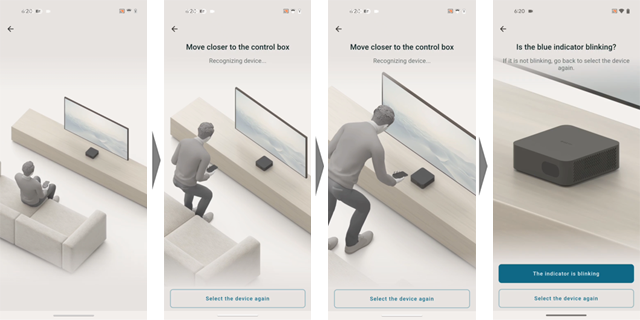
The BRAVIA Connect app serves as the setup guide for BRAVIA Theatre Quad. The app connects to Sony's home audiovisual equipment via the cloud. During UX development for the initial setup flow, members aimed for the "ultimate simple experience" in which customers can set up BRAVIA Theatre Quad without having to read instructions.
"Customers may not be familiar with some parts of the initial setup for BRAVIA Theatre Quad," explains Takaaki Ema of Sony Corporation. "One example is optimizing the sound field. Moreover, setup involves repeatedly switching between operation of devices such as the main unit, speakers, and smartphone app. We designed the BRAVIA Connect app so that customers can perform initial setup with confidence and without confusion, even in the case of unfamiliar operations."

"The BRAVIA Connect app seamlessly guides users through the setup operations included in the initial setup; specifically, connecting the cable to the TV, positioning and connecting the speakers, and optimizing the sound field. In order to provide customers with an intuitive understanding of operations, the app uses 3D animation to illustrate customers' movements and their position in relation to equipment. The seamless guidance and animations allow customers to complete the setup process as if they were watching a single continuous video. Another outstanding feature of the BRAVIA Connect app is that it provides the most appropriate guidance according to the customer's situation. For example, when connecting an HDMI cable to a TV, the app detects the cable connection status and then changes to the appropriate guidance. If the cable is connected correctly, the guidance proceeds to the next step. However, if the cable is connected to the wrong terminal, the guidance prompts the customer to connect the cable to the correct terminal. This kind of smart guidance can only be provided by a mobile app. The app adapts to the situation in order to provide the customer with the appropriate guidance at the right time. We have also put a lot of thought into how to best communicate our instructions. For example, when a customer is experiencing difficulty in setup, the app guides them using conversational phrases such as `Are you not able to XXXX?' This language creates the feeling of dealing with a trustworthy and knowledgeable colleague," says Ema.

The three members all feel that the UX design of the completed BRAVIA Theatre Quad and BRAVIA Connect app is a big hit. How do the three members plan to evolve and develop home audio in the future based on a Human-Centered Design (HCD) process?
"We still lack a full understanding of how our customers use home audio," explains Hayashi. "In fact, there are cases when the whole family isn't watching the same movie. For example, parents might be watching a movie on the home audio system while children enjoy music on headphones—all in the same living room. We must better understand how other audio devices are used, and how these devices work together within a home, and what roles are shared by the devices. I seek to propose new value through enhanced dialogue with customers, in-depth examination of issues and needs, and a deeper understanding of our customers."
"I feel that we are making progress by using an HCD process and prototyping to incorporate the visualization of experiences using into the upstream development process, and by using both technology and UX to create new value," says Tamaki. "I want to take our work a step further and incorporate features that will surprise and thrill our customers.
"The challenges faced in developing BRAVIA Theatre Quad will be useful in providing new experiences for televisions and home audio components going forward," explains Ema. "I want to create new and better things through an HCD process which involves creating prototypes at an early stage and then engaging in repeated testing and verification for the purpose of repeated improvements."

